- Decide on the number of boxes of checks you want.
- Click on the best priced supplier in the table below. Highlighted in Yellow.
Supplier |
Using Coupon Code | Using Coupon Code | Using Coupon Code | ||||||
|---|---|---|---|---|---|---|---|---|---|
| Checks Unlimited | $4.95 | R66Q (FS,IO) | 5 | $4.95 | R66Q (FS,IO) | 2.5 | $11.90 | R66Q (FS,IO) | 3 |
| Message Products | $4.95 | R66Q (FS,IO) | 5 | $4.95 | R66Q (FS,IO) | 2.5 | $11.90 | R66Q (FS,IO) | 3 |
| Artistic Checks | $4.95 | 24DD (FS,IO) | 5 | $4.95 | 24DD (FS,IO) | 2.5 | $11.90 | 24DD (FS,IO) | 3 |
| Designer Checks | $4.95 | 7RRY (FS,IO) | 5 | $4.95 | 7RRY (FS,IO) | 2.5 | $11.90 | 7RRY (FS,IO) | 3 |
| Check Gallery | $4.95 | 4K29 (FS,IO) | 5 | $5.05 | 4K29 (FS,IO) | 2.5 | $12.00 | 4K29 (FS,IO) | 3 |
| Extra Value Checks | $11.99 | 7 | $23.98 | 7 | $47.96 | 7 | |||
| Styles Checks | $7.00 | KRFZ (FS,IO) | 7 | $7.00 | KRFZ (FS,IO) | 3.5 | $14.00 | KRFZ (FS,IO) | 3.5 |
| Carousel Checks | $8.99 | 9 | $17.98 | 9 | $35.96 | 9 | |||
| Checks On Sale | $8.99 | 9 | $17.98 | 9 | $35.98 | 9 | |||
| FS=Free Shipping, FSH=Free Shipping and Handling, RC=Reorder Customers, IO=Introductory Offer | |||||||||
| Last Updated: July 12, 2023 | |||||||||
DISLAIMER: We have not actually ordered in all the quantities from all these suppliers. We do not guarantee you will get these prices. You may pay more if you want to get designs which are licenced from third parties - eg Disney, Marvel, sporting teams and more. Always look out for extras that you may need to opt-out from, if you want the lowest price. Also be aware of handling charges, often applied per box, and shipping, which can be significant if you want to get your order quickly.
Free Shipping coupon codes are often available from some suppliers, which can reduce the overall costs for an order. These offers may only apply to some of the methods of shipment, so look in detail at your selected shipping type. The combination of cheap checks, free shipping and no handling charges gives you the best overall deal.
You may be able to get even cheaper prices by looking around for other coupons. There are often good codes on the printers web site, so try clicking through to their offers page or pages to see what is currently available. We have a listing page with check offers pages. We hope to be adding more printing companies in the future.
Why Order Cheap Checks Online?
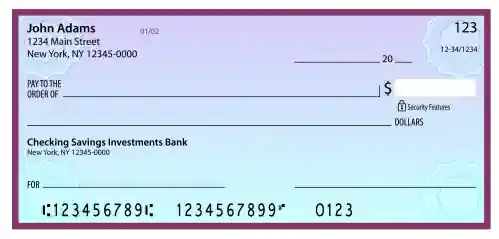 When you order online you cut out the middleman - the bank - and deal more closely with the printer. The profits that the bank makes on the checks are taken out of the purchase and so it can be offered at a much lower price. Savings of up to 50% or more are often quoted. In short you get cheap checks that are as high quality as the ones your bank provides. A more flexible provider can also often give you the styles and options you want, rather than those the bank wants to provide you with. So you can get animal themes or your special charity or cause for personal use. Some companies will even make a small donation to charitable organizations when you order checks from them that show your support for the cause.
As you start to look, you will find that there are hundreds of designs to chose from for personal use. Online suppliers often offer 100% satisfaction guarantees. So if there is a problem that is not fixed to your satisfaction you can call upon the guarantee. You can also normally find the status of your order online, so you know that everything is proceeding as planned and there are no surprises.
Introductory Offers, Coupon Codes and Promotional Specials

How to Order
This will, of course, vary depending on the supplier you chose. So we can only offer a guideline. The web site where you place your order will provide full details. Be sure to ask questions if you are unsure of any details. You need to select the design you want, the format and the quantity. If you want any accessories then you will add them to your shopping cart as well.You need some information on hand to complete your purchase. If you are reordering from a company where you have previously ordered then they should have most of this information already. Here is a summary of information required. It may vary depending on your supplier and any special requirements. You should refer to an existing check to get this information, if possible.
• Bank Routing Number
• Your Checking Account Number
• The Starting Check Number
• Your Name
• Your Address including Zip Code
Make sure you enter all information exactly as you want it to be printed. With this sort of important information it it worth a final recheck to make sure it is perfect. Your shipping address is important - you want your order to arrive safely where you want them. You will also have to enter payment/billing information to pay for the purchase. A final look to make sure everything is ok and then place your order.
Ordering Security
When you use online ordering for your checks you would be aware that you are entering sensitive personal and financial information. So it is important to make sure that the web site where you are ordering is suitable for this purpose. Ordering pages should be encrypted. You can check this by making sure it is a "https" page and that there is a padlock symbol in your browser (if supported by your browser), which indicates the security status of the page. You can click onto or hover over the appropriate area of your browser to obtain more security information, including the provider of the digital certificate which identifies the web site.Check Styles and Types Available
There are a varied set of formats available to suit your requirements and preferences. We have a page detailing many of the available personal check formats. How you keep records is a deciding factor in choosing your style. Here is an overview of the various styles of checks, note that there can be some overlap or duplication in naming:
• Wallet - single or duplicate checks in a top tear format
• Duplicate - a carbonless copy paper per check provides an automatic copy as writing is bing performed.
• Top Tear - they are attached to the checkbook at the top and are torn at the top.
• Top Stub - top tear style with a record stub for writing transaction details.
• Side Tear - they are attached at the left to the checkbook.
• End Stub - side tear style that leave a record stub on the left.
• Single - wallet format that do not have duplicates - the basic style.
• Photo - custom personalized checks which have an end user supplied photo printed onto them as a special option. This can be for security purposes or for the ultimate in customization.
• Duplicate - a carbonless copy paper per check provides an automatic copy as writing is bing performed.
• Top Tear - they are attached to the checkbook at the top and are torn at the top.
• Top Stub - top tear style with a record stub for writing transaction details.
• Side Tear - they are attached at the left to the checkbook.
• End Stub - side tear style that leave a record stub on the left.
• Single - wallet format that do not have duplicates - the basic style.
• Photo - custom personalized checks which have an end user supplied photo printed onto them as a special option. This can be for security purposes or for the ultimate in customization.
Stubs and Tears
Checks are torn off the checkbook when used and it is a personal preference where the tear should be positioned. Most often they are torn off from the top of the pad, however some people prefer to tear off the left of the checkbook. When it is torn off there is the option of leaving a stub, hence top stub and end stub formats. Deskset checks are almost exclusively 3 to a page and left torn, leaving an end stub. They are designed to be placed in a binding folder for easy record keeping. Any stub that is left behind is able to be used for record keeping purposes, as a sort of register. If you need details of that old payment in the future a correctly and fully filled in stub can be invaluable.Personalization Options
Most online suppliers are able to offer some special options when you make your purchase. These include special lettering and fonts, symbols or monograms and a special message. This is of course in addition to the normal personal and bank information to be placed on the checks.Photo Checks
You can take customization to a new level by placing your own picture on your checks. This can be for security purposes, where a photo of you is used to verify identity by being placed on the checks, or just because you like the photo. It could be of a family pet or a beautiful scene from nature. This type of checks let you really decide on the design.Frequently Asked Questions (FAQ)
This website has a FAQ page which you are encouraged to look at if you have further questions. We hope to keep it updated with new answers as we get new questions.Parts of a Check
The basic parts include:
• Bank Name and Address
• Routing Number, which corresponds to your bank
• Bank Account Number
• Check Number
• Your Personal Details
• Signature Line
• "Pay to" line
• Numerical Amount box
• Date Line
The design must conform to standards set by ANSI and in doing so is acceptable by banks. Our Anatomy of a Check page gives more detail.
• Routing Number, which corresponds to your bank
• Bank Account Number
• Check Number
• Your Personal Details
• Signature Line
• "Pay to" line
• Numerical Amount box
• Date Line
Check Security
A modern design will have a number of security features to reduce the possibility of fraud. Some features may be optional (for example security hologram checks generally are only available on certain specialized designs). These protections can include:
• Microprint Signature Line
• Chemical Protection
• Erasure Protection
• Original Document Security Screen
• Special Paper
The padlock symbol appearing on you checks is an icon representing the security features. Have a look on the back for some details of
the fraud prevention methods provided. There is even the possibility of adding a kind of "check insurance" for you where you have a certain amount of
coverage against fraud. Make sure you read the fine print on this, as with all products of this type.
• Chemical Protection
• Erasure Protection
• Original Document Security Screen
• Special Paper